storebound logo storebound

Open source · for apps and games

From zero to Submit for review on both app stores.

Your AI coding agent sets up Google Play and the App Store for your app or game: records, products, listings, forms and store art. Dry runs first. The Submit click stays yours.

bunx storebound init

Needs Bun (opens in a new tab) 1.1+. No account, no sign-up.

Store screenshots, every size, every language

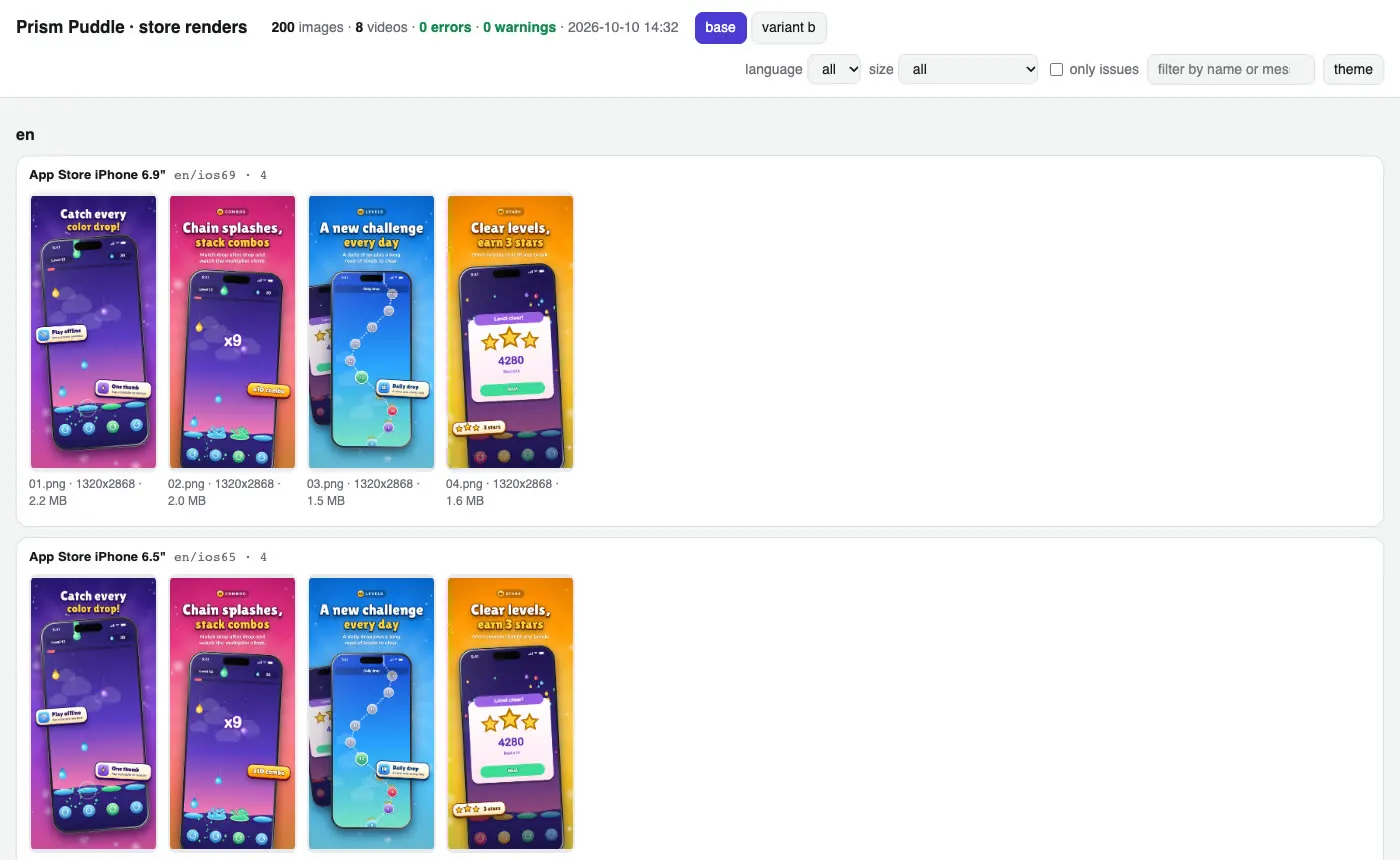
One command rendered 200 store-ready images: 6 device sizes plus the Play feature graphic, 4 languages, an A/B variant. Then checked them against both stores' specs: 0 errors.

$ storebound shots render --variants

  • EN
  • JA
  • AR
  • TR
  • EN
  • JA
  • AR
  • TR
  • EN
  • JA
  • AR
  • TR
  • EN
  • JA
  • AR
  • TR

200 images · iPhone 6.9" and 6.5", iPad 13", Play phone, 7" and 10" tablet, feature graphic

By hand 200 exports from a design tool, each dropped into the right slot in two consoles.

Real output · examples/demo-game and demo-app · offline commands and dry runs, nothing sent to a store
  • MIT licensed
  • Zero runtime dependencies
  • No telemetry
  • --dry on every write
  • 25 Agent Skills + MCP server

Works with Claude Code · Codex · Cursor · Gemini CLI · Copilot · Windsurf · OpenCode · or just the CLI

How it works

Five steps, from an empty repo to your Submit click.

storebound lives in your app's repo. Describe the app once, add your keys, then ask your agent or run the commands yourself.

  1. Start in your app repo

    Pick a profile. Adds config and store files, never overwrites.

    Terminal
    $ bunx storebound init --profile app
    Profiles appsubscription-appgame
    • storebound.config.tsids, languages, products, Data safety
    • store/listing text, questionnaire answers, screenshot captions
    • .storebound/your keys, gitignored

    Needs Bun (opens in a new tab) 1.1+, plus ffmpeg for icons, screenshots and video.

  2. Describe the app once

    One config for both stores, checked offline.

    storebound.config.ts
    const config: ShipConfig = {
      app: { name: 'My App', profile: 'app' },
      languages: [
        { id: 'en', play: 'en-US', apple: 'en-US' },
        { id: 'tr', play: 'tr-TR', apple: 'tr' },
      ],
      play:  { packageName: 'com.example.app' },
      apple: { bundleId: 'com.example.app' },
    };
    Terminal
    $ bunx storebound check

    Store text lives next to it in store/listing.md and store/appstore.md, one section per language.

  3. Add your store keys

    Official API keys you create and can revoke.

    .storebound/credentials.jsongitignored
    {
      "PLAY_SERVICE_ACCOUNT": "/keys/play.json",
      "ASC_KEY_ID": "KEY_ID",
      "ASC_ISSUER_ID": "ISSUER_ID",
      "ASC_P8": "/keys/AuthKey_KEY_ID.p8"
    }

    A Play service account and an App Store Connect API key. Env vars work too. Never your password, never committed.

  4. Connect your agent, ask in plain words

    It runs dry runs first and walks you through console-only forms.

    Terminal
    $ bunx storebound install --agent claude

    Or codex, cursor, copilot, gemini, windsurf, opencode (per tool). No agent? Every step is a CLI command too.

    • Set up my in-app products on both stores
    • Make store screenshots in 14 languages
    • What still blocks my submission?
  5. Zero blockers, then you submit

    A read-only check of both stores, in fix order.

    Terminal
    $ bunx storebound validate
    1. Blockers, per store, in fix orderbuild, encryption, metadata, screenshots, review details, prices, products
    2. Fix, run again, until zeroread-only, so it is safe to run as often as you like
    3. You press Submit for reviewand Send changes for review on Play. Never the agent.

Built for

  • Indie developers

    One app or a handful: the store chores without a week of console tabs.

  • Studios shipping many titles

    One config per title, the same checks and store art pipeline every time.

  • Agencies

    Reviewable config in the client's repo. Their keys, their Submit.

A first session

What talking to your agent looks like.

One request, dry runs, your yes, then what is left for you. An example with the demo list app; output lines follow the real CLI format, ids and numbers are illustrative.

example · tidy-lists
you: Add a yearly Pro plan with a 1-week free trial and a monthly plan, on both stores.agent: Adding both to subscriptions in storebound.config.ts (USD 29.99 / 3.99, Turkey set by hand). Dry runs first.$ bunx storebound check
09:41:02 [check] config ok: storebound.config.ts
09:41:02 [check] subscriptions: 2 in 1 group(s)
09:41:02 [check] all good
$ bunx storebound apple subscriptions --dry
09:41:05 [apple] reading subscription groups, subscriptions, ...
09:41:07 [apple] 1/9 create subscription group "Tidy Pro"
09:41:07 [apple] 3/9 create pro_yearly (ONE_YEAR, level 1)
09:41:07 [apple] 6/9 pro_yearly: introductory offer FREE_TRIAL P1W
09:41:07 [apple] subscriptions planned (dry run, nothing written; ...) (5s)
$ bunx storebound play subscriptions --dry
09:41:10 [play] 1/2 pro_yearly: create, base plan yearly (P1Y) in 173 regions · intro offer intro (free)
09:41:10 [play] 2/2 pro_monthly: create, base plan monthly (P1M) in 173 regions
09:41:10 [play] subscriptions planned (dry run, nothing written) (3s)
agent: Plan matches the config. Create them on both stores?you: yes$ bunx storebound apple subscriptions && bunx storebound play subscriptions
09:42:31 [apple] group "Tidy Pro" created
09:42:33 [apple] 1/2 pro_yearly: created
09:42:52 [apple] subscriptions done (first ones are submitted with an app version: ...) (21s)
09:43:04 [play] pro_yearly: base plan yearly activated
09:43:05 [play] pro_yearly: offer intro created and activated
09:43:07 [play] subscriptions done (25s)
$ bunx storebound validate
 1. BLOCKER [apple] pro_yearly: no review screenshot
      fix: subscriptions[].reviewScreenshot, then storebound apple subscriptions
 2. warn    [apple] description without a Terms of Use link: tr (3.1.2; ...)
09:43:20 [validate] 1 blocker(s)
agent: Left for you: a paywall screenshot for the reviewer (I'll upload it), the Terms link in the Turkish description, and in App Store Connect, adding the first subscriptions to the version's submission (no API; I'll walk you through it).Submit for review · your click
Example session: the user asks for two subscriptions, the agent runs storebound dry runs, the user confirms, storebound creates them on both stores, and validate lists what is left.

See it

49-second teaser: a scripted terminal run with the demo game, then the desktop app, from config to “Submit for review · your click”. Has music.
  • Dry runs first. Every write shows its plan before anything reaches a store.
  • Your yes. The agent asks before writing, and never submits or releases.
  • Console-only forms come with exact clicks and prepared answers, not guesses.

The journey

Everything an app or game needs before review, in order.

For each step: what storebound does through the store APIs or on your machine, what a skill walks your agent through where the stores have no public API, and what stays your own click.

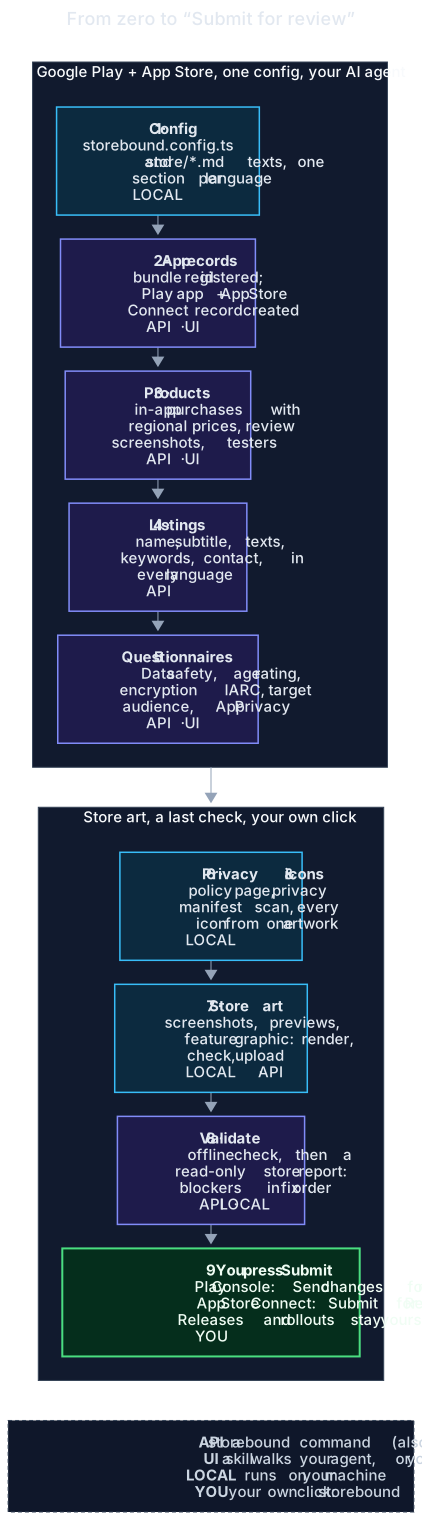
The journey: config, app records, products, listings, questionnaires, privacy and icons, store art, validate, then you press Submit. Each step is tagged API, UI, local or you.
  • API a storebound command (also an MCP tool)
  • LOCAL runs on your machine
  • UI a skill guides your agent, or you, through the console
  • YOU your own click

Rejection scan

Catch rejections before you submit.

storebound scan reads your project offline and read-only: Xcode and Gradle files, Info.plist, manifests, entitlements, lockfiles and engine settings, plus your config and listings. It works out the stack and the SDKs, then reports every rejection risk it can prove, each with the guideline, the evidence as file:line, the fix, a severity and the skill to open.

$ storebound scan
Rejection risks: 2 blocker, 3 high, 0 medium, 0 low
  1. BLOCKER 2.1(a) · App Store · Sign-in is required but there is no demo account for App Review
       at storebound.config.ts:12  reviewAccess: { signInRequired: true, instructions: 'Sign in with the demo account.' },
       at storebound.config.ts:11  accounts: { enabled: true },
       at Podfile.lock:3  Google Sign-In: GoogleSignIn 7.1.0
  2. BLOCKER 5.1.1(v) · App Store · Accounts can be created but no in-app account deletion was found
       at storebound.config.ts:11  accounts: { enabled: true },
       at Planner/LoginView.swift:11  Button("Create account") { Task { try await AccountApi.signUp() } }
       at Planner/LoginView.swift:17  static func signUp() async throws {
  3. HIGH    4.8 · App Store · Third-party login (Google / Facebook / ...) without Sign in with Apple or another equivalent login option
       at Podfile.lock:3  Google Sign-In: GoogleSignIn 7.1.0
       at Planner/LoginView.swift:9  GIDSignIn.sharedInstance.signIn(withPresenting: rootViewController()) { _, _ in }
  ... 2 more findings; every finding also has a fix: line and the skill

What it proves, on both stores

  • 2.1(a)App access

    A sign-in with no demo account for the reviewer.

  • 5.1.1(v)Account deletion

    Sign-up or social login without an in-app deletion path or a deletion URL.

  • 4.8

    Google or Facebook login without Sign in with Apple or another equivalent option.

  • 3.1.1, 3.1.2Payments

    No Restore Purchases path, card SDKs next to in-app products, missing subscription terms.

  • 5.1.2Data safety

    Tracking SDKs without ATT; SDK data types missing from App Privacy or Data safety.

  • 5.1.1, ITMS-91053

    Permissions without purpose strings; a missing or incomplete privacy manifest.

  • Restricted permissions

    Background location, photos, all files, accessibility, exact alarms, foreground services, and the Console declaration each one needs.

  • 1.3Families

    Ad or analytics SDKs in a Kids Category or child-directed app.

  • Target API, 16 KB pages

    targetSdk below 36; Unity, React Native, NDK or AGP versions without 16 KB page support.

  • 2.3.7, 2.3.10Metadata

    Other apps' names, "best / #1", keyword lists, other stores in App Store text, placeholder text.

  • 2.2

    "Beta", "demo" or "test" wording in the app name and the listing.

  • 4.3Repetitive content

    scan --originality --against <folders> adds the near-duplicate check against your other apps.

  • 4.8 App Store guideline
  • Families Google Play policy

Below the risks comes a proposal for Data safety, App Privacy, ATT and the privacy manifest from the detected SDKs, each answer marked detected or ask owner. Nothing is written unless you run scan --write. validate includes the open findings, and the desktop app shows them on its Checks tab.

API or console, honestly

What it automates, what your agent walks through, what stays your click.

API

storebound does it

A CLI command, also an MCP tool. Every write has --dry.

  • Bundle id, builds on tracks, versions and build selection
  • Listings in every language, graphics, screenshots, app previews
  • In-app products with regional prices
  • Play Data safety (the whole form, from the config)
  • Apple age rating, categories, content rights, price and availability
  • Export compliance answer, App Review details
  • Phased release and staged rollout
  • TestFlight groups, testers, What to Test
  • Crash / ANR vitals, review replies, analytics, price CSV, product page tests
UI

Skill + your agent walk through

No public API. The skill has the exact navigation and prepared answers; an agent with browser tools clicks while you watch, or you use it as a checklist.

  • Creating the App Store Connect app record and the Play app
  • Play App content: IARC content rating, target audience, ads, advertising ID, app access, government / financial / health / news
  • Play category, tags and countries
  • App Privacy labels and their Publish
  • Adding the first IAPs to the submission
  • Play store listing experiments
YOU

Only you

Public, legal or money steps. The skills tell every agent to stop and hand these to you. None of them is an MCP tool.

  • Developer accounts, agreements, banking and tax
  • The answers to the questionnaires: they are your statements
  • Play: Send changes for review
  • App Store: Submit for Review
  • Releasing an approved version, resuming or completing a rollout or phased release
  • Beta App Review, tester invitations, sending review replies, applying price changes, starting a product page test

Apps and games

Not just for games. Pick a profile, start from honest templates.

init --profile app (the default: utility or productivity app, optional account, analytics, no ads), --profile subscription-app or --profile game. Each profile brings its own config, Data safety and App Privacy answers, declarations, listing and screenshot copy, all marked “edit to match your app”.

Both storesAPI

Subscriptions

Apple groups and levels, Play base plans, regional prices from one USD base, free trials, promotional offers and offer codes. Plan first, then your yes.

apple subscriptions · play subscriptions
Both storesAPI

One catalog, both stores

Consumables, non-consumables, non-renewing passes and subscriptions from one list. A parity report shows what is missing, mismatched or priced differently per region.

catalog diff
Both storesAPI

Review access

A demo account for the reviewer, kept only in .storebound/, sent to App Review masked; the Play App access answer prepared.

apple review-details
Both storeslocal

Account deletion

Apple 5.1.1(v) in-app deletion and Play's delete-account page: in the config, the review notes and the checks.

check · validate

Questionnaires

Every store form, prepared. The ones with an API, filled.

init gives you prepared answers (store/declarations.md, store/app-privacy.md), per profile: a utility app with an account, a subscription app, or a free-to-play game with ads and IAP. Change what does not match your app; the agent asks you whenever the code does not prove an answer.

Google PlayAPI

Data safety

The whole form from dataSafety in the config, imported as CSV through the API. The import replaces the form, so the config is the single truth.

play data-safety
Google PlayUI

IARC content rating

No public API. The store-declarations skill has the exact clicks and the prepared answers; your agent fills it in while you watch, or you copy them in.

store-declarations
Google PlayUI

Target audience and content

Walked through by the skill, together with ads, advertising ID, app access and the government, financial, health and news cards.

store-declarations
App StoreUI

App Privacy labels

From store/app-privacy.md, entered in App Store Connect, then Publish: saved labels that are not published are a classic blocker.

store-declarations
App StoreAPI

Age rating

The age rating declaration through the API, together with categories, content rights, Free price and availability.

apple appinfo
App StoreAPI

Export compliance

The answer comes from apple.usesNonExemptEncryption in your config, never guessed. When it is yes, the export-compliance skill covers the documentation.

apple encryption

validate cannot see the console-only forms, so the store-preflight skill lists them as a manual check before you submit.

Works with

Your AI coding agent. Or none.

Every route gives the agent the same skills and the same MCP tools. The skills are plain Markdown and the CLI is a normal command, so nothing here requires a particular tool.

  • Claude Code
  • OpenAI Codex
  • Cursor
  • GitHub Copilot
  • Gemini CLI
  • Windsurf
  • OpenCode
  • anything that reads AGENTS.md

Store art

Screenshots and previews, every size, every language.

The step that takes longest by hand, in two looks: app (calm gradient, device frame, headline and subline) and game (sunburst, sparkles, badges). Everything below was made by storebound itself from two tiny fictional demos, a list app (“Tidy Lists”) and a game (“Prism Puddle”): raw frames from the web build, captions in 4 languages, every store size, a review gallery and an app preview video.

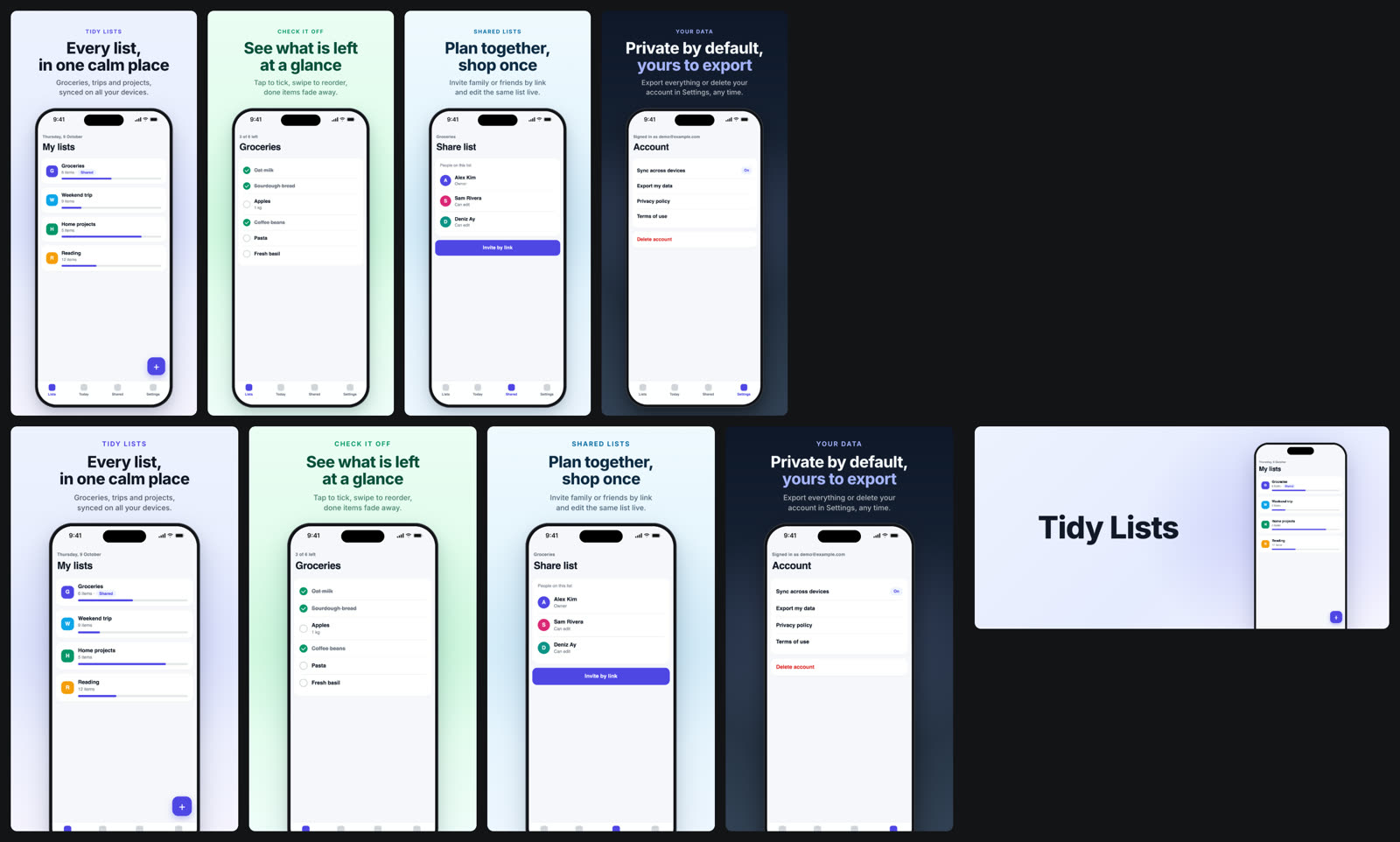
App style: four calm screenshots of a demo list app in two sizes and its feature graphic
App style: the demo list app, iPhone 6.9" and Play phone sizes, feature graphic.
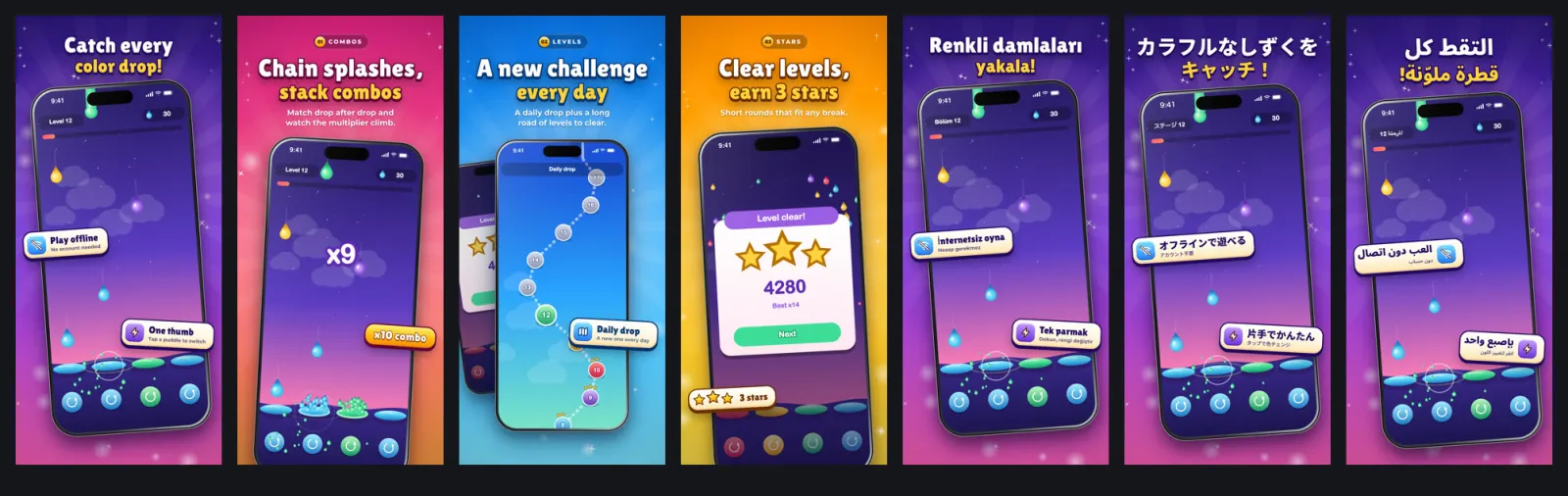
Store screenshots rendered by storebound: four scenes in English plus the hero scene in Turkish, Japanese and Arabic
Game style: four scenes in English, the hero scene in Turkish, Japanese and Arabic (right to left).
The review gallery: every language, size, scene and variant on one local page, store check issues highlighted
shots gallery: every language, size, scene and variant on one local page, store check issues outlined.
App preview, cut by shots video.
  • Capture from a web build (Playwright), the iOS Simulator, an Android emulator or a folder of your own frames.
  • Render iPhone 6.9" and 6.5", 13" iPad, Play phone, 7" and 10" tablets, the 1024 x 500 feature graphic. 24-bit RGB, no alpha.
  • Check the store rules locally with shots check; validate repeats it next to the store state.
  • Fonts subset to exactly your characters, so Japanese, Chinese, Korean, Arabic and Hindi just work.

After launch

The app is live. storebound keeps going.

Drafts and dry runs by default; anything that reaches users or money waits for your yes.

App StoreAPI

TestFlight

Beta groups, testers from a local CSV, builds to groups, What to Test in every language. Beta App Review stays your click.

apple testflight
Both storesAPI

Crash and ANR health

Play vitals against the bad-behaviour thresholds and App Store diagnostics, in validate and a weekly report.

health --weekly
Both storesAPI

Review replies

Your agent drafts replies to new reviews into local files. Only drafts you mark approved are sent, after a confirmation.

reviews draft
Both storesAPI

Prices from one CSV

Every product in every region at once. A diff table first, then your yes; App Store price changes can be dated.

prices import
Both storesAPI

Analytics snapshots

Installs, page views and conversion next to your listing changes and experiments. App Store through the API, Play from your monthly reports bucket.

analytics compare
App StoreAPI

Product page tests

A/B screenshot sets from your variants into App Store Product Page Optimization. Starting a test stays your click.

apple ppo

Everything else

The rest of the toolbox, one line each.

Same rules as everywhere else: reads run, writes show a dry run first, and public steps stay your click. storebound help lists every command.

  • wsrelease status|plan

    Many apps and studios at once; one release train per version across both stores, and what is left on each.

  • api

    Every App Store Connect and Google Play API operation. GET runs; writes stay dry.

  • apple buildapple uploadplay buildplay uploadapple signing

    Build, sign and upload with the next free build number, from the terminal.

  • console fill

    AI-assisted autofill of console-only forms in a visible browser you sign in to. Stops before Save or Submit.

  • apple testflightapple cppapple eventsapple offer-codesapple win-backapple preorderreportstriage

    Store operations: betas, custom product pages, in-app events, offers, pre-orders, sales reports and crash feedback.

  • prices ppp

    A purchasing-power price sheet, snapped to each store's price points.

  • ads apple

    Apple Ads campaigns and reports: spend, taps, installs and CPA per campaign or keyword.

  • web init|check

    Smart App Banner, apple-app-site-association, assetlinks.json and a landing page, then a live check.

  • apple adhocplay share

    Ad-hoc builds for registered devices and Play internal app sharing links.

  • revenuecat diff|sync

    Keep a RevenueCat catalog, entitlements and offering in step with your config.

  • flow list|runnew

    Repo-local workflows in store/workflows/*.yml, e.g. next build, build, upload, wait, What's new, validate, scan, plan. Writes stay dry unless --apply; submit and release steps show as your click; --from resumes.

  • listing translate --to de-DE,janew

    Listing drafts per language with each store's limits and keyword rules, translated by your agent or a --translate hook, marked as drafts until reviewed.

Desktop app · preview

Every app on both stores, in one window.

storebound desktop shows every app and game you ship: releases on both stores, catalog parity, listings, crash health, reviews and TestFlight. It drives the same open source CLI, keeps store keys in the system keychain, shows a dry run before every change, and never presses Submit.

storebound desktop, Portfolio: every app of every studio grouped by studio, with its state on Google Play and the App Store
Portfolio: every app of every studio, both stores side by side.
storebound desktop, Releases: the release timeline of the demo game Prism Puddle, both stores rolling out at 20 percent
Releases: one timeline per version, both stores rolling out.
storebound desktop, Checks: the Rejection risks card with the scan findings of the demo game
Checks: the rejection scan findings, with evidence and the fix.

Quick start

Five minutes to a checked config.

1Add it to your app or game

cd my-app
bun add -d storebound playwright
bunx storebound init    # --profile app (default) | subscription-app | game
bunx storebound check   # offline: config, copy limits, Data safety, products, files

Credentials come from environment variables or the gitignored .storebound/credentials.json: a Play service account key and an App Store Connect API team key.

2Connect your AI tool

Claude Code

/plugin marketplace add https://git.crt.fyi/CRT/storebound.git
/plugin install storebound@crtkafa

Skills, MCP server and storebound on PATH. Or per project: bunx storebound install --agent claude

OpenAI Codex

bunx storebound install --agent codex

Skills in .agents/skills, MCP in .codex/config.toml (Codex reads it for trusted projects). The repo is also a Codex plugin, skills only.

Gemini CLI

gemini extensions install https://git.crt.fyi/CRT/storebound.git

Skills, MCP server and GEMINI.md. Or bunx storebound install --agent gemini

Cursor

bunx storebound install --agent cursor

Skills in .agents/skills and .cursor/mcp.json. The repo's .cursor/rules/storebound.mdc is an agent-requested rule you can copy.

VS Code / GitHub Copilot

bunx storebound install --agent copilot

Skills in .github/skills and .vscode/mcp.json.

Windsurf (Devin Desktop)

bunx storebound install --agent windsurf

Skills in .agents/skills, MCP in your global mcp_config.json.

OpenCode

bunx storebound install --agent opencode

Skills in .opencode/skills and opencode.json.

Anything that reads AGENTS.md

Copy or link AGENTS.md (rules and skill index) into your project and use the CLI. For an MCP client install does not know: command bunx with args ["storebound", "mcp"].

install takes several agents at once (--agent codex,cursor), --dry to preview, and only touches its own storebound entry and skill folders. Re-running it is safe.

3Ask your agent

  • “take my app to Google Play and the App Store”
  • “fill in the store questionnaires”
  • “add a yearly subscription with a free trial on both stores”
  • “the reviewer could not sign in”
  • “make store screenshots in 5 languages”
  • “is my app ready to submit”

The matching skill takes over. No AI tool? The skills are Markdown checklists you can read yourself.

Safety model

Built to be handed to an agent.

  • Credentials stay out of the repo

    Env vars or the gitignored .storebound/credentials.json. Official store APIs only, with keys you create and can revoke, never your password.

  • Dry run everywhere

    Every write command takes --dry; every MCP write tool has dry_run, default true.

  • Nothing public or irreversible through an agent

    Submitting, releasing, production releases, resuming or completing a rollout, canceling a submission, deleting and creating offer codes are not MCP tools. Demo accounts for reviewers live only in .storebound/. They stay terminal commands that ask first.

  • Idempotent writes

    Re-running converges (MD5 checks for screenshots and previews, one Play edit per language), so a failed upload is fixed by running it again.

  • Careful with your devices

    storebound shuts down only a simulator it booted itself, and never boots, wipes or reboots an Android emulator or device.

FAQ

Questions, answered.

The short version. The README has the long one, with every command and what each store allows through its API.

Do I need an AI agent?

No. Every step is a CLI command too (bunx storebound --help), and the skills are Markdown checklists you can read yourself for the console-only forms. The agent integrations are optional.

Will it press Submit for me?

No, never. Submitting, releasing, completing a rollout and deleting are not MCP tools, and the terminal commands for them ask first. storebound gets you to zero blockers; you press Submit for review on the App Store and Send changes for review on Play.

Is it only for games?

No. --profile app (the default) and --profile subscription-app bring templates for utility and subscription apps: accounts, account deletion, demo accounts for review, subscriptions on both stores and a calm screenshot style. --profile game is for free-to-play games with ads and in-app purchases.

Where do my keys go? Is my store account safe?

In environment variables or .storebound/credentials.json, which init gitignores. storebound uses the official store APIs with keys you create and can revoke, never your password. Use an App Store Connect key with the App Manager role and a Play service account limited to your app. Every write is a dry run until you say yes.

My app is Unity, Godot, Flutter, React Native or native.

Fine. The store commands work on build numbers and listing files, not engines. Screenshots and clips come from a web build, the iOS Simulator, an Android emulator or device, or a folder of your own frames.

Does it cost anything? Any telemetry?

It is free and open source under the MIT license. No account, no sign-up, no telemetry: it only talks to the Google Play and App Store Connect APIs with your keys. You still need your own Play Console and Apple Developer accounts.

Can I use it for many apps?

Yes. Each app or game gets its own config in its own repo, so the same checks and store art pipeline run for every title. If you ship many similar apps, storebound originality --against <folders> compares one against the others offline (listing text, name, icon and screenshot perceptual hashes, project structure) for Apple's spam guideline (4.3) and Play's repetitive content policy, and exits with 1 on a near-duplicate. storebound scan --originality runs the same check as part of the scan, and the portfolio-originality skill walks your agent through the fixes.

Does it run on Windows or Linux?

It runs wherever Bun 1.1+ runs; it does not run on plain Node. The store commands are API calls. Capturing from the iOS Simulator needs a Mac with Xcode; a web build, an Android emulator or a folder of frames works anywhere. Icons, screenshots and video also need ffmpeg.