 CRT
710c3a53d0
README is a short front page (about 120 lines) with one real visual per section; every former section moved
unchanged into docs/*.md with a docs/README.md index (journey, rejections, getting-started, commands, growth,
studios, store-art, listing-languages, api, skills, mcp, safety, faq, project). The site tells the same story on one
page: the teaser in the hero, real CLI output as text, the desktop app as a section with light/dark captures of eight
screens and the per-system downloads (desktop/latest.json); /desktop/ redirects to /#download. New capture tools:
tools/site-desktop-shots.ts (fixture-mode desktop frames) and tools/site-term-shots.ts (real CLI output as text and
WebP). tests/docs-links.test.ts checks README, docs and site links resolve.
12 KiB
The journey: from an empty folder to Submit for review
Why storebound
Hey, I'm CRTkafa. I built this while getting my own game through both stores and hit every wall on the way: draft apps, edits that die when you touch the Console, the "first IAP must ship with a version" dance, Data safety CSVs that silently need one more answer, an IARC questionnaire, target audience, App Privacy labels that are saved but not published, screenshots in 7 sizes x 14 languages... I wrote each fix down as code or as a checklist. None of those walls is game-only: a to-do app with accounts and a subscription hits the same ones, plus a few of its own (a demo account for the reviewer, account deletion, subscription disclosures), so storebound covers apps and games alike. It works for me, so I open-sourced it. Use it too.
No account, no sign-up, no telemetry. A small Bun CLI that talks to the official store APIs, Agent Skills that walk your AI coding tool (or you) through the parts that are still console clicks, and an MCP server so agents can call the CLI safely. storebound never presses Submit, Release or Publish for you.
How agents use storebound
Do it, don't ask. Your AI agent and storebound do the work: API calls, uploads, builds, CSV and template exports, every console page (open, Get Started, Edit, Next, Save draft), console forms and the check afterwards. You are not asked to click through consoles or run commands one by one.
- You press only the final public or irreversible buttons: Submit for review, releasing a version or a production rollout, App Privacy Publish, legal agreements; plus deleting store data, changing live prices, sending review replies and inviting or removing testers. The agent prepares each one and shows you the dry run first.
- You answer only what no file can prove (Data safety, App Privacy, age rating, export compliance, partial
deletion): all of it in one batch at the start (
storebound check/validatelist the questions), saved in the config so nobody asks again. - The loop: plan, the agent drives (API first, its browser for consoles without an API), verify by reading back,
continue.
checkand--drycatch what a store would refuse before anything is written.
The full rules are in AGENTS.md (generated from docs/agents-core.md).
Profiles and after launch
Pick a profile and start from honest templates: init --profile app (utility / productivity app, optional account,
analytics, no ads; the default), --profile subscription-app (accounts + auto-renewable subscriptions) or
--profile game (free-to-play with ads and IAP).
It keeps going after launch: TestFlight groups and testers, crash and ANR vitals against the store thresholds, review replies you approve before they go out, prices for many products and regions from one CSV, store analytics next to your listing changes, and App Store product page tests from your screenshot variants.
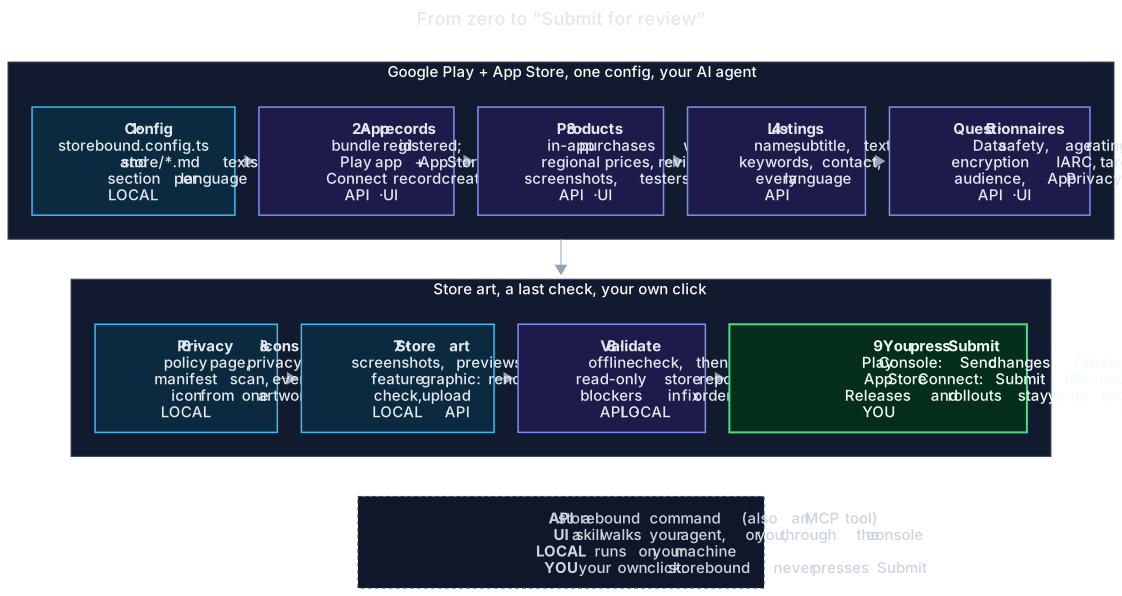
The journey
Everything an app or game needs before review, in the order I do it. For each step: what storebound does through the store APIs (or on your machine), what the skill walks your agent through where the stores have no public API, and what stays your own click.
- storebound: a CLI command (also an MCP tool). Every write has
--dry; MCP write tools default to a dry run. - skill + agent (UI): no public API exists for it. The named skill has the exact navigation and the prepared answers. An agent with browser tools (a Chrome extension, computer use, a Playwright MCP ...) can click through it while you watch; without one, you click with the skill as your checklist.
- you: public, legal or money steps. The skills tell every agent to stop and hand these to you.
| # | step | storebound (API / local) | skill + agent (UI) | you |
|---|---|---|---|---|
| 1 | Set up | init --profile app|game|subscription-app (config, store/*.md, declarations, App Privacy and privacy templates per profile), install --agent <tool>, check |
Play: service account + API access invite; App Store: API team key (play-first-release, appstore-first-release) |
developer accounts; Paid Applications agreement, banking and tax; Play payments profile |
| 2 | App records and bundle id | apple bundle registers the bundle id, apple status finds the app record |
App Store Connect > New App (no API); Play Console > Create app; the very first AAB upload when Play needs it from the Console | the declarations you accept when creating the Play app |
| 3 | Builds and testers | play next-version-code, play build, play upload --track internal, apple signing ensure, apple build, apple upload (waits for processing), apple encryption, apple testflight groups / what-to-test / info / distribute (internal groups) |
Play internal testers list, Apple sandbox testers (play-first-release, testflight) |
apple testflight testers (Apple emails the invitations), external groups and Beta App Review (distribute --submit-review) |
| 4 | In-app products and subscriptions | play products (regional prices from USD + your overrides, activated), apple iap (consumable, non-consumable, non-renewing; localizations, price schedule, availability), apple iap-review, apple subscriptions (groups, levels, equalized prices, intro and promotional offers, offer codes), play subscriptions (base plans, regional prices, offers), catalog diff (both stores against one catalog) |
Play license testers, Apple sandbox testers, "Add for Review" of the first IAPs and subscriptions into the version's submission, Play promo codes (store-iap-setup, store-subscriptions) |
custom offer codes (apple subscriptions --codes asks first) |
| 5 | Store listings, every language | play listing (title, short / full description, contact email + website, promo video URL), apple listing --version x --build N (name, subtitle, description, keywords, promo text, URLs, privacy URL, manual release), listing translate (drafts per language), whats-new, check (limits), check --aso |
Play store settings: category and tags (play-first-release) |
|
| 6 | Play questionnaires | play data-safety: the whole Data safety form from dataSafety in the config (CSV import through the API) |
Policy and programs > App content, answers prepared in store/declarations.md (store-declarations): privacy policy, app access with the demo account (review-access), delete-account URL (account-deletion), ads, content rating (IARC), target audience and content, advertising ID, news, government, financial and health features; Data safety summary check |
the answers themselves are your statements: the agent asks when the code does not prove them |
| 7 | App Store questionnaires | apple appinfo (categories, age rating declaration, content rights, Free price, availability), apple encryption (export compliance from apple.usesNonExemptEncryption, never guessed), apple review-details (contact, demo account from .storebound/, notes) |
App Privacy nutrition labels from store/app-privacy.md, then Publish (store-declarations); encryption documentation when the answer is yes (export-compliance); the first availability record if the API refuses it |
the export compliance answer (a legal statement, set once in the config) |
| 8 | Privacy and accounts | privacy policy page template (init), privacy-manifest --ios <path> (PrivacyInfo.xcprivacy, required-reason APIs, SDK manifests), validate checks the policy, delete-account and terms URLs answer |
host the pages, link them in both consoles and inside the app; in-app account deletion (privacy-policy, privacy-manifest, account-deletion) |
|
| 9 | Icons | icons: App Store 1024 without alpha, Play 512, adaptive + legacy Android launcher icons, web icons, Capacitor sources |
||
| 10 | Screenshots and previews | shots capture / render / check / gallery, play images, apple screenshots, shots record / video, apple previews, apple ppo create / upload (App Store product page tests from shots variants; see Store art) |
Play store listing experiments (optional, store-screenshots) |
uploading the promo video to YouTube; apple ppo start / stop |
| 11 | Validate | scan (offline: rejection risks in the project files, see Catch rejections before you submit), check (offline) and validate (read-only on both stores: every blocker in fix order, plus the local renders) |
the UI-only items validate cannot see (store-preflight lists them) |
|
| 12 | Submit | play release --version-code N --production draft, apple status |
Play: countries / regions, open the production draft and save it (play-first-release) |
Play: Send changes for review. App Store: Submit for Review. |
| 13 | After review | apple status --wait-review, apple release --phased on / pause, play rollout --halt, reply drafts (review-rejections) |
releasing the approved version, resuming or completing a phased release or rollout (terminal commands that ask first, release-management) |
|
| 14 | Live app | health [--weekly] (crash / ANR vitals vs Play's thresholds, App Store diagnostics; also in validate), reviews list / draft, analytics snapshot / compare, prices export, prices import --dry, apple ppo status |
store-health, review-replies, store-analytics; Play statistics come from the reports bucket (no API) |
reviews send (approved drafts only), prices import (asks first) |
New personal Play developer accounts also need a closed test with 12+ testers for 14 days before production; the
play-first-release skill covers it.
API or console, honestly
- Through the API (storebound does it): bundle id, builds on tracks, versions and build selection, listings in every language, graphics, screenshots, app previews, in-app products and prices (also from one CSV), Play Data safety, Apple age rating, categories, content rights, price and availability, export compliance answer, App Review details with the demo account, subscriptions (Apple groups, levels, prices, introductory and promotional offers, offer codes; Play base plans, regional prices, offers), phased release and staged rollout, TestFlight groups / testers / What to Test / Test Information / build processing / expiring builds, crash and ANR vitals and App Store diagnostics, TestFlight feedback, review replies, App Store analytics reports, sales and finance reports, App Store Product Page Optimization tests, IAP and subscription review submissions, offer codes for one-time purchases, win-back offers, promoted IAPs, pre-orders, custom product pages and in-app events, and pulling live listing texts back.
- Console only (no public API; the skill + your agent's browser, or you): creating the App Store Connect app record and the Play app, Play App content (IARC content rating, target audience, ads, advertising ID, app access, government / financial / health / news, app access with the demo account), Play category and tags, Play countries, App Privacy labels and their Publish, Play promo codes, Play pre-registration, Play store listing experiments, test results of both stores' experiments, promotional images of promoted IAPs. Play store statistics have no API either: storebound reads the monthly exports from your Play reports bucket.
- Only you: agreements, banking and tax, and the final Send for review / Submit for Review (apps, IAPs, custom product pages, in-app events). Releases and rollouts after approval, Beta App Review, tester invitations, sending review replies, applying price changes, starting / stopping a product page test, creating offer codes, win-back offers, switching on promoted IAPs, pre-orders and expiring builds too. None of these is an MCP tool; the terminal commands ask first.